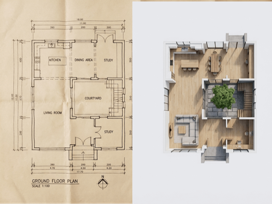
What is AI Floorplan to 3D Visualization?
AI Floorplan to 3D is an innovative tool that uses artificial intelligence to convert flat 2D floor plans into beautiful 3D isometric visualizations. Instead of spending hours in complex 3D modeling software or hiring visualization specialists, you can upload any floor plan and watch as our AI transforms it into a professional architectural render in seconds.
Our AI architectural visualization technology interprets your floor plan layout and generates a 3D view with clean modern architecture, realistic materials like wood flooring and furnishings, balanced lighting that shows depth and dimension, and professional-quality rendering suitable for presentations and marketing.
Whether you're an architect presenting to clients, a real estate agent marketing properties, an interior designer exploring layouts, or a homeowner planning renovations, our free floorplan to 3D converter helps you visualize spaces like never before.
How to Convert Floorplans to 3D in 3 Steps
Upload Your Floor Plan
Upload any 2D floor plan — hand-drawn sketches, CAD exports, architectural drawings, or even photos of printed plans. The AI can interpret various styles and formats. Cleaner plans with clear room boundaries produce the best results.
AI Generates Your 3D Visualization
Select the "Floorplan to 3D Visualization" preset and optionally add reference images for style guidance. The AI analyzes your layout and creates a stunning 3D isometric view with realistic materials, furniture suggestions, and professional lighting. Processing takes just seconds.
Download & Present
Download your 3D visualization in high resolution. Use it in client presentations, marketing materials, property listings, or design portfolios. Generate multiple variations to explore different styles and furnishing options.
AI Floorplan to 3D Features
🏠 Isometric 3D Views
Generate beautiful isometric perspectives that show your entire layout from an elevated angle, perfect for understanding spatial relationships and flow between rooms.
🪵 Realistic Materials
AI applies realistic material textures — wood flooring, tiles, carpets, wall finishes — that bring your visualization to life with authentic detail.
💡 Balanced Lighting
Professional lighting simulation creates depth and dimension, with natural shadows and ambient illumination that makes spaces feel real and inviting.
🛋️ Furnished Layouts
The AI can suggest and place furniture appropriate to each room type, helping clients visualize how spaces will actually be used and lived in.
🎨 Style Reference Support
Upload reference images to guide the AI's style choices — modern minimalist, cozy traditional, industrial chic, or any aesthetic you want to achieve.
📐 Clean Modern Architecture
Generates detailed but uncluttered visualizations with professional architectural quality suitable for presentations and marketing materials.
Perfect for Every Design & Real Estate Need
🏗️ Architects & Designers
Transform CAD drawings and architectural plans into impressive 3D presentations. Help clients understand designs before construction begins.
- • Convert technical drawings to client-friendly visuals
- • Generate quick concept visualizations
- • Present multiple design options rapidly
- • Create portfolio-worthy renderings
🏡 Real Estate Agents
Make property listings stand out with 3D floor plan visualizations. Help buyers understand layouts and imagine themselves in the space.
- • Enhance property listings with 3D visuals
- • Show unfurnished spaces with furniture
- • Create compelling marketing materials
- • Help buyers visualize potential
🎨 Interior Designers
Explore layout options and present design concepts to clients. Visualize furniture arrangements and spatial flow before making commitments.
- • Test furniture arrangements quickly
- • Present design concepts visually
- • Communicate ideas to clients clearly
- • Explore multiple design directions
🏠 Homeowners & Renovators
Planning a renovation or new build? See your floor plans in 3D to better understand the space and make informed decisions.
- • Visualize renovation plans before starting
- • Understand room sizes and flow
- • Share plans with contractors and family
- • Explore different layout options
🏢 Property Developers
Create marketing visuals for pre-construction sales. Show potential buyers exactly what units will look like without expensive 3D modeling.
- • Generate visuals for off-plan sales
- • Create consistent marketing across units
- • Scale visualization production affordably
- • Update designs quickly as plans evolve
📚 Students & Educators
Perfect for architecture and design students learning to visualize spaces, or educators teaching spatial design concepts.
- • Learn spatial visualization skills
- • Create project presentations quickly
- • Explore design concepts affordably
- • Build impressive portfolios
Why Choose Our AI Floorplan to 3D Tool?
Tips for Best 3D Visualization Results
1. Use Clear, High-Contrast Floor Plans
Floor plans with clear black lines on white backgrounds produce the best results. If using scanned documents, ensure good contrast and clean edges.
2. Include Room Labels
When possible, include room labels (Kitchen, Bedroom, etc.) in your floor plan. This helps the AI understand room types and furnish them appropriately.
3. Show Wall Thickness
Floor plans that clearly show wall thickness give the AI better information to create realistic 3D walls and spatial relationships.
4. Use Reference Images for Style
Upload 1-2 reference images showing the interior style you want — modern, rustic, Scandinavian, etc. The AI will match these aesthetics in the 3D render.
5. Specify Room or House Type
In your prompt, mention if it's an apartment, house, office, or specific room type. This helps the AI make appropriate design decisions.
6. Generate Multiple Variations
Try generating several versions — each will have slightly different furniture arrangements and styling, giving you options to choose from.
AI Floorplan to 3D FAQ
What types of floor plans work?
Almost any 2D floor plan works — CAD exports (DWG, DXF converted to image), architectural drawings, scanned plans, hand-drawn sketches, and even photos of printed floor plans. Cleaner, higher contrast plans produce better results.
How accurate is the 3D visualization?
The AI interprets your floor plan layout to create a representative 3D visualization. While proportions are generally maintained, these are artistic visualizations rather than precise architectural models. Perfect for presentations and concept visualization.
Can I control the furniture and style?
Yes! Upload reference images to guide the AI's style choices. You can also run multiple generations to get different furniture arrangements and find the one that best represents your vision.
What viewing angle does it generate?
The tool generates isometric 3D views — an elevated, angled perspective that shows the entire layout clearly. This is ideal for understanding spatial relationships and overall design.
How fast is the conversion?
Processing typically takes 10-30 seconds per visualization. Much faster than the hours or days required for traditional 3D modeling.
Can I use this for commercial purposes?
Absolutely! Use your generated 3D visualizations for client presentations, marketing materials, property listings, portfolios, and any commercial purpose.
Does it work for different building types?
Yes! The AI works with residential floor plans (apartments, houses), commercial spaces (offices, retail), and other building types. Mention the building type in your prompt for best results.
What resolution are the outputs?
Generated visualizations are high resolution, suitable for presentations, marketing materials, and print. Perfect for professional use.
AI Visualization vs Traditional 3D Modeling
| Aspect | Traditional 3D Modeling | AI Floorplan to 3D |
|---|---|---|
| Time Required | Hours to days | Seconds |
| Cost | $200-$2000+ per visualization | Pennies per render |
| Skills Required | 3D modeling expertise | None — just upload |
| Software | SketchUp, Revit, 3ds Max | Just a browser |
| Iterations | Time-consuming revisions | Instant regeneration |
| Best For | Precise technical renders | Quick concept visualization |
Ready to Visualize Your Floor Plans in 3D?
Try our free AI floorplan to 3D converter now — no credit card required
Contact Us →